
Higgsfield AI Pricing: Plans, Credits and Real Video Costs
Higgsfield AI pricing from $9 a month: plan costs, credits per model, what retakes add and a formula to price a real video project.

Higgsfield AI pricing starts at $9 a month for a paid plan, but that number says little about what a finished video costs. Every plan buys credits, and every generation spends them at a rate set by model, clip length and resolution.
The gap is wide. A 3,000-credit balance on the Ultra plan produces 42 ten-second Seedance 2.5 clips at 720p if each lands on the first attempt, or 6 at 1080p if each takes three. Completed attempts are charged even when the footage gets thrown away, and unused credits expire at renewal, which is the biggest trade-off in the whole model.
This guide prices the whole job. It covers each plan, what clips cost in credits and dollars, how to cut retakes, the credit and refund rules, four alternatives, and a formula for pricing a project before paying.
Where Higgsfield Costs Add Up
Higgsfield is an AI creative platform with 35+ image and video models, including Seedance, Kling and Veo, all drawing on one credit balance. A plan fee is fixed, and the spending it funds is not. Every image or video deducts credits, and the exact cost shows on the Generate button before anything runs.
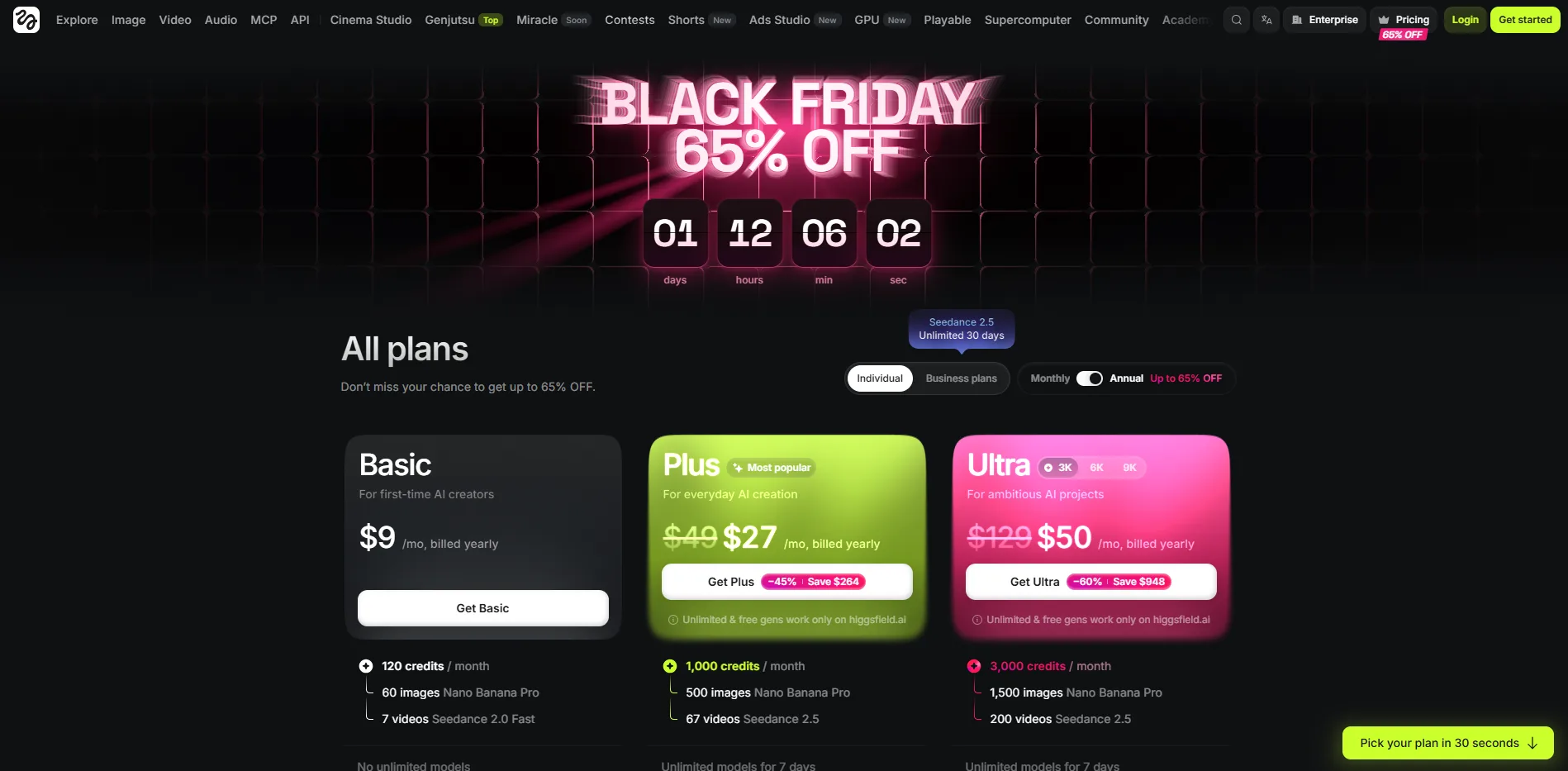
The plan cards show the best case. Plus lists 67 Seedance 2.5 videos for its 1,000 credits and Ultra lists 200 for 3,000, which works out to about 15 credits a video. A 10-second 1080p Seedance 2.5 clip costs 160. Between those two figures sits the gap between a card and a bill, and the sections below measure it.
The plans set the starting allowance, so they come first.
Higgsfield Plans Compared
Each plan sets a credit balance and decides which models and tools can spend it.
Plan | Monthly price | Credits | Cost per credit | The card's headline example | Unlimited models |
|---|---|---|---|---|---|
Free | $0 | None | n/a | A limited set of models | None |
Basic | $9 | 120 | ≈$0.075 | 60 Nano Banana Pro images or 7 Seedance 2.0 Fast videos | None |
Plus | $49 | 1,000 | ≈$0.049 | 500 Nano Banana Pro images or 67 Seedance 2.5 videos | 7 days |
Ultra | $129 | 3,000 | ≈$0.043 | 1,500 Nano Banana Pro images or 200 Seedance 2.5 videos | 7 days |
Cost per credit is the listed price divided by the credit allowance. Ultra also comes in 6,000 and 9,000 credit options.
Higgsfield's Basic, Plus and Ultra plan cards listing 120, 1,000 and 3,000 credits per month, with example outputs and unlimited-model notes
Higgsfield's plan cards list each plan's credits and a headline example.
Free: There are no monthly credits, and Higgsfield states that video generation needs the credits that come with paid plans.
Basic to Plus: This is the jump that matters. Plus's card moves from Seedance 2.0 Fast to Seedance 2.5, and Higgsfield lists Start & End Frame control, Speak (lipsync) and the UGC builder (ad-style clips) from Plus up. Basic also costs about 53 percent more per credit than Plus.
Ultra: My read is that this is a volume decision. It gives three times Plus's credits, yet each credit is only about 12 percent cheaper. The extra $80 pays off when a Plus balance runs out mid-month or queues slow a project.
Commercial use: Every paid plan includes it. A plan license doesn't replace a record of what was generated, and a published Originality Charter shows one studio's practice of logging each generated element with its tool, purpose and a named reviewer.
Billing: Annual billing costs less per month, and promotional prices on monthly billing renew at the list price, as the plan cards state. An account holds one subscription, and upgrades apply immediately with a prorated charge.
Regions: Plan names, prices and credits are adjusted by country and tax is added at checkout, as Higgsfield's US pricing guide notes, so a reader's own pricing page can differ from the list prices here. Higgsfield's help center on how plans work names that page as the one that always shows current prices.
An independent walkthrough of Higgsfield's plans, credits and Unlimited models covers the same ground on video.
A plan sets the allowance, and clip prices decide how fast it drains.
Credit Cost Per Clip
The table prices common settings at the Plus rate of about $0.049 per credit. The last column shows the cost of one usable clip that took three attempts.
Model and setting | Credits | One attempt | Three attempts |
|---|---|---|---|
Wan 2.5 Speak (lipsync), 5s, 480p | ≈6 | ≈$0.29 | ≈$0.88 |
Kling 4.0, 5s, 1080p | 16.25 | $0.80 | ≈$2.39 |
Veo 3 Fast with audio, 8s, 720p | ≈22 | ≈$1.08 | ≈$3.23 |
Seedance 2.5, 10s, 480p | 30 | $1.47 | ≈$4.41 |
Veo 3 with audio, 8s, 720p | ≈58 | ≈$2.84 | ≈$8.53 |
Seedance 2.5, 10s, 720p | 70 | $3.43 | ≈$10.29 |
Seedance 2.5, 10s, 1080p | 160 | $7.84 | ≈$23.52 |
Discounts are personal, so an account may show less than these figures.
Length: Price rises with seconds. Seedance 2.5 costs 7 credits a second at 720p and 16 at 1080p.
Resolution: Ten seconds of Seedance 2.5 costs 30, 70 and 160 credits at 480p, 720p and 1080p.
Model: For the same 5 seconds at 1080p, Kling 4.0 costs 16.25 credits and Seedance 2.5 costs 80. That compares price only, not quality.
Sound and bitrate: Neither changes the price of a 10-second 1080p Seedance 2.5 clip, so leave sound on. File size follows the bitrate chosen for delivery, and a free bitrate and file size calculator estimates it for any duration.
Extras: A 2K reference image from Higgsfield's Soul 2.0 model costs 0.125 credits, and upscaling or extending a clip costs a full generation.
A creator's breakdown of what one Higgsfield video costs in real money shows the same 35 and 80 credit prices for a 5-second Seedance 2.5 clip.
The third column shows why attempts matter as much as price.
How to Cut the Cost of Retakes
A finished clip costs one attempt's price times the number of attempts. Failed generations are refunded automatically, while completed ones never are, even when the result misses the brief.
Five attempts at a 10-second 1080p Seedance 2.5 shot cost 800 credits, 80 percent of a Plus month. That multiplier also explains the opening numbers. At 70 credits per 720p clip, 3,000 credits give 42 clips, while a 1080p clip that took three attempts costs 480 credits, which gives 6. Scenes add more, since Higgsfield's worked example of a finished clip shows a 30-second ad needing at least three attempts, and six with one retake per shot.
Bar chart of the cost of one usable 10-second Seedance 2.5 clip at 480p, 720p and 1080p after one, two and three attempts, from $1.47 to $23.52
Each extra attempt adds the full price of the clip again.
Four habits keep attempts low.
Plan the beats first: The cut on the change of intent principle advises writing the sequence of beats before arranging footage, which gives every shot a job and cuts regenerations.
Fix the frame first: A wide video can't be cropped to vertical without breaking the composition, as a free aspect ratio tool explains, so choose the ratio before the first run.
Draft at 480p: Seedance 2.5 drafts at 480p can be finalized at 1080p within seven days. Three 30-credit drafts plus one 160-credit final cost 250 credits, against 480 for three 1080p attempts, assuming a finalize costs the standard 1080p price. My read is that this is the biggest saving on the list.
Test on lighter models: Seedance 2.0 Fast and Seedance 2.0 Mini cost less per attempt than Seedance 2.5.
Higgsfield's explainer on why AI video credits run out goes further. Credits spent on drafts at least produce footage, while credits left at renewal produce nothing.
Credit Expiry, Packs and Refunds
Higgsfield's credits explainer sets out what happens to credits at the end of a cycle.
Monthly credits: They reset each billing cycle and don't roll over on individual plans. Annual plans reset every 30 days, so the date drifts off the calendar month. Enterprise is the exception.
Packs and Auto-Refill: Bought packs and automatic top-ups expire 90 days after purchase and need an active subscription. Auto-Refill is not available on the entry-level plan.
Spending order: Monthly credits go first, then packs and promo credits by soonest expiry.
Canceling: Monthly credits last until the paid period ends. Pack and promo credits stay, but only work on models open to the free plan.
Refunds: Higgsfield refunds within 7 days of the first purchase, only if no credits have been used, minus a service fee of up to 6 percent. Renewals are non-refundable, and the first generation that spends credits closes the refund window. Generations on Unlimited models spend none, so they leave it open.
Running short: A top-up suits an occasional shortfall. A shortfall every month points to a larger plan.
Some models skip credits entirely through Unlimited, which covers less than the name suggests.
Unlimited Models Explained
Higgsfield's help center describes Unlimited models as specific models that don't use credits for a set period while the Unlimited toggle is on. The plan cards list it directly. Basic has no unlimited models, while Plus and Ultra list unlimited models for 7 days, mostly image models, with video limited to short windows.
Unlimited works only on the Higgsfield website and runs in a standard queue, so it can slow down at peak hours. Cinema Studio never falls inside an Unlimited window, and anything generated through Higgsfield's automation tools always uses credits.
For most video work, credits stay the main cost. Code and teams are billed differently.
API and Team Billing
Generating from code is billed separately. The Higgsfield API has its own dollar balance, so plan credits can't be moved to it. It charges per second of video, for example $0.084 per second for Kling 3.0 at 720p without audio, and it doesn't charge for failed requests. Teams that would rather render video from data and templates than generate it can look at a Remotion and programmatic video service.
Higgsfield's comparison of API pricing against subscriptions puts the break-even near 300 usable 8-second clips a month. At two attempts per clip, that volume costs $403.20 on the API against $1,075 for the smallest team plan that covers the credits.
Teams pay per seat.
Team: $79 per seat per month with 1,000 credits per seat, for 2 to 9 members.
Scale: $215 per seat with 2,500 credits per seat, for 5 to 15 members, adding first-month credit rollover, priority queue access, SSO and spend controls.
Higgsfield's Team, Scale and Enterprise plan cards showing 1,000 credits per seat for Team, 2,500 per seat for Scale and custom credits for Enterprise
Higgsfield's Team and Scale cards list credits per seat and the pooled monthly total for five seats.
Seats on a business plan share one pooled balance. Four Team seats cost $316 for 4,000 shared credits, while four separate Plus plans cost $196 for the same 4,000 credits split into four balances.
With plans, clips and billing covered, the last step is matching them to real work.
Choosing a Plan by Workload
One formula prices any project.
Credits per attempt × attempts per usable clip × $0.049 = cost of one usable clip
Credits per attempt comes from the clip table. The number of attempts is the figure only your own history can supply, so start with two or three and replace the guess with a logged number after one billing cycle. The table applies the formula to five sample jobs.
Job | Credit math | Credits needed | Plan that covers it | Left over |
|---|---|---|---|---|
25 Nano Banana Pro images, 2 credits each, 2 attempts each | 25 × 2 × 2 | 100 | Basic | 20 |
4 Seedance 2.5 clips, 10s, 720p, 3 attempts each | 4 × 3 × 70 | 840 | Plus | 160 |
One 60-second video, six Seedance 2.5 shots of 10s at 1080p, 1 attempt per shot | 6 × 1 × 160 | 960 | Plus | 40 |
The same video at 720p | 6 × 1 × 70 | 420 | Plus | 580 |
4 Seedance 2.5 clips, 10s, 1080p, 3 attempts each | 4 × 3 × 160 | 1,920 | Ultra | 1,080 |
Rows three and four show how much resolution matters, since the same 60-second video costs 960 credits at 1080p and 420 at 720p. Row three also hides an assumption. At two attempts per shot it doubles to 1,920 credits and needs Ultra.
Horizontal bar chart of credits needed for five sample jobs, from 100 to 1,920, against monthly allowances of 120 on Basic, 1,000 on Plus and 3,000 on Ultra
Each sample job sits under the allowance of the plan that covers it.
A short checklist settles the rest.
Images and a few short clips: Basic.
Seedance 2.5, Veo, Speak or the UGC builder: Plus.
Balance gone before month-end, or queues slowing work: Ultra.
Two to nine people sharing one balance: Team, or Scale for 5 to 15 people who need SSO.
Generating from code at volume: The API.
Before settling, it is worth pricing the same job somewhere else.
Higgsfield Alternatives Worth Comparing
Four tools are worth pricing against Higgsfield, ordered from the closest match to its credit-per-generation model to the furthest.
Runway
Runway runs several video models from one credit balance, including its own Gen-4.5.
Pricing: Free with 125 one-time credits, then $15 a month ($12 annually) for 625 credits, up to $95 ($76) for 9,500.
Best for: One balance across several video models.
Limits: A 5-second 1080p Kling 4.0 clip costs 118 credits, about $1.84 at the Pro monthly rate against roughly $0.80 on Higgsfield, and Standard and Pro credits don't roll over.
OpenArt
OpenArt puts 100+ image, video and audio models behind one credit pool, with a Director tool for multi-scene videos.
Pricing: $14 a month ($13 annually) for 4,000 credits.
Best for: Multi-scene ads and short films with consistent characters.
Limits: Starter covers about 50 videos, and commercial rights start on Plus at $34 a month.
Luma
Luma combines its own Ray models with third-party ones such as Veo 3.1 and Kling 3.0 in one workspace.
Pricing: $30 a month ($25 annually) for 10,000 credits, up to $300 for 150,000.
Best for: Teams sharing credits across images, video and audio.
Limits: Its cheapest paid plan costs more than Higgsfield Basic at $9, and unused credits expire each cycle.
CoAnimator
CoAnimator lets an AI agent you already use, such as Claude Code or Codex, build a product demo, launch video or tutorial scene by scene. Projects stay editable files, with no credit meter.
Pricing: Free forever, with a one-time lifetime license.
Best for: Demos and tutorials that must stay editable as the product changes. Runway and Higgsfield fit better for generated footage.
Limits: It needs a coding agent to drive it, and it has no built-in analytics.
Whichever tool fits, prices and models keep moving, which shapes what to do next.
Questions
6Is Higgsfield free to use?
Higgsfield has a free plan, but it gives no monthly credits and only a limited set of models, and its videos can carry a watermark. Video generation runs on the credits that come with a paid plan, which starts at $9 a month.
How many videos do 1,000 credits make?
It depends on the model and resolution. On Seedance 2.5, 1,000 credits cover about 33 ten-second drafts at 480p, 14 clips at 720p or 6 clips at 1080p, if every clip works on the first attempt. Each retake uses credits again.
Is annual billing cheaper than monthly billing?
Yes. The monthly rate is lower on annual billing, but the full year is charged upfront. Switching from monthly to annual takes effect immediately with a prorated charge, and an annual plan goes back to monthly billing after the paid year ends.
Where do I find my Higgsfield invoice?
Invoices are in Manage Account, under Subscription and then Invoices. A VAT or Tax ID can be added at checkout.
What payment methods does Higgsfield accept?
Cards, Apple Pay, Google Pay and supported bank payments work. PayPal and cryptocurrency are not accepted, and local tax is added at checkout based on the billing location.
What happens to my work if I cancel?
Canceling turns off auto-renewal and keeps access until the paid period ends. After that the account moves to the free plan, everything in Assets stays in place, and new free-plan generations are private by default.
Conclusion
Credit prices follow the model menu, and the menu keeps growing. Kling 4.0 now sits beside Kling 3.0, and Higgsfield's pricing post for Kling 4.0 shows each new model arriving with its own credit rate. A plan that fits today's mix of models can stop fitting after one release, so the number worth trusting is the one your own project produces.
The most useful next step costs nothing. Pick one video already on the calendar, write down its model and resolution, and price it with the formula. Run it for a billing cycle, log how many attempts each usable clip took in real, and let that retry rate choose the plan. Each generation is a small purchase, so a storyboard that fixes every shot before the first click is the cheapest edit available. Then check the total against the current plan cards and prices on Higgsfield before subscribing.
If a video brief is already on the table, Original Design Studio's Motion & Video service can take it from script to platform cutdowns, and the team reads every brief and replies within two working days, even when it is the wrong studio for the job.