Kling AI Pricing: Plans, Credits and the Cost of Creating Videos
Kling AI pricing explained, with plan prices, credit costs, how long credits last and how to size a plan before paying for video generation.
A ten-second 1080p clip with sound costs 120 credits on Kling 3.0, and the cheapest paid plan includes 660 credits for $8.80 a month. Three takes to land one usable clip use 360 of them, more than half the month, before a second clip begins. That arithmetic is why Kling AI pricing confuses people. The plan price is fixed, while the price of a finished video moves with length, resolution, sound and retries.
The fine print adds more. The $6.99 first month applies once, plan credits expire after a month, and the plan that looks cheapest costs the most per credit of any plan. The one that looks steepest is the cheapest per clip, provided its credits get used.
Below, every plan is priced by the finished clip instead of the monthly fee, and each gets a usage level at which it starts beating plain credit top-ups. Billing rules and API pricing follow.
How Kling AI Credits Work
Kling AI is Kuaishou's AI video generator, sold as monthly or yearly memberships that include a pool of credits. Every generation spends credits, and VIDEO 3.0 meters them by the second of video produced. Clips run from 3 to 15 seconds. Kling 4.0, the newest model, stretches that to 30 seconds with native audio, and the rates below are the published ones for 3.0. For how generators like Kling differ from avatar and agentic tools, our overview of AI video generation sorts the categories.
VIDEO 3.0 splits into two modes, native audio and no native audio, at two resolutions.
Setting | Credits per second | 5-second clip | 10-second clip |
|---|---|---|---|
720p, no native audio | 6 | 30 | 60 |
1080p, no native audio | 8 | 40 | 80 |
720p, native audio | 9 | 45 | 90 |
1080p, native audio | 12 | 60 | 120 |
Voice control, added to native audio | +2 | +10 | +20 |
Native 4K | 30 | 150 | 300 |
Native audio adds 50% to the rate at both resolutions, and 1080p adds a third over 720p. Native 4K costs 2.5 times the most expensive 1080p setting. Whether sound earns its surcharge depends on how much of the message rides on it, and our video and editing principles argue that sound carries half of the picture.
Those rates only mean something against what a plan includes, starting with the plan that costs nothing.
Kling AI Free Plan
Basic costs $0 and does not expire, so the useful question is what it leaves out.
Credits: Basic has no monthly plan allowance. Free accounts can claim a batch of free credits on login, but Kling does not publish the amount, so it has to be read inside an account.
Rights: Generated content is not for commercial use, and non-members must keep Kling's brand mark on it.
Paid-only tools: Fast-track generation, 1080p output, watermark removal, video extension and image upscaling all sit behind a membership.
Bought credits: Anyone can buy credits, but credits alone do not add membership benefits, so a free account with a bought balance still produces branded, non-commercial output.
For how Kling's free tier sits next to other free plans, we compare free image-to-video tools on credits, rights and limits.
Anything headed for a client or a channel needs a paid plan, and the paid ladder is less even than the names suggest.
Kling AI Plans and Cost per Credit
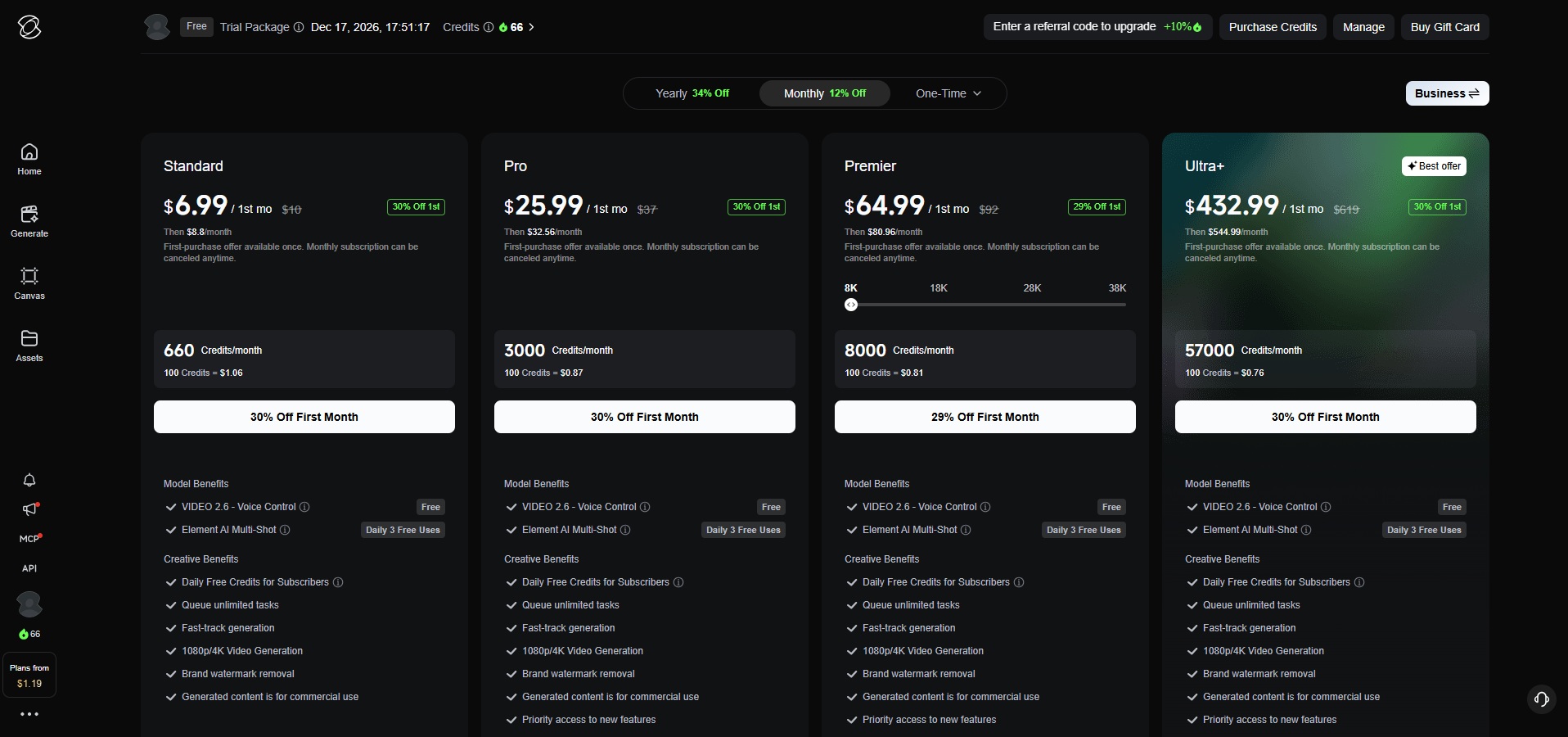
Kling's membership page sells four individual tiers. Each monthly plan opens with a first-month offer that applies once, then renews at a higher price. The table adds the cost per 100 credits, the unit the page itself uses, at renewal and on yearly billing.
Plan | Credits per month | First month | Renewal | Yearly | Per 100 credits, renewal | Per 100 credits, yearly |
|---|---|---|---|---|---|---|
Standard | 660 | $6.99 | $8.80 | $79.20 | $1.33 | $1.00 |
Pro | 3,000 | $25.99 | $32.56 | $293.04 | $1.09 | $0.81 |
Premier, 8,000-credit step | 8,000 | $64.99 | $80.96 | $728.64 | $1.01 | $0.76 |
Ultra+ | 57,000 | Varies by offer | $544.99 | $4,902.99 | $0.96 | $0.72 |
Credits bought outside a plan cost $1.52 per 100 at Kling's standard rate of $1 for 66 credits. Monthly billing is labeled 12% off list and yearly billing 34% off, and the yearly rate holds only if each month's credits get used. Every paid plan carries the premium tools listed above plus commercial-use rights.
The ladder is steep at the bottom and flat at the top. Moving from Standard to Pro cuts the renewal cost of a credit by about a fifth, and each step after that trims less than a tenth. Premier is four plans in one, with credit steps from 8,000 up to 38,000, and the table shows its entry step.
First-month prices move with promotions, so checkout can show a different number from the table. Renewal is the figure to budget on for any plan kept past month one.
A cost per credit still does not say what a video costs, which depends on what gets generated and how often it has to be redone.
Cost of a Kling Video
Kling bills the seconds it generates and not the seconds that survive the edit, so the price of a clip is its credits per attempt times the number of attempts. No published figure says how many tries a usable clip takes, so the table assumes three. Swap in your own count.
Clip A is five seconds at 720p without audio, 30 credits an attempt. Clip B is ten seconds at 1080p with native audio, 120 credits an attempt. Prices use each plan's renewal rate.
Plan | Clip A, cost per usable clip | Clip A, usable clips per month | Clip B, cost per usable clip | Clip B, usable clips per month |
|---|---|---|---|---|
Standard | $1.20 | 7 | $4.80 | 1 |
Pro | $0.98 | 33 | $3.91 | 8 |
Premier, 8,000-credit step | $0.91 | 88 | $3.64 | 22 |
Ultra+ | $0.86 | 633 | $3.44 | 158 |
At three attempts, Standard's 660 credits cover a single Clip B a month, and Pro's 3,000 stop at eight.
Failed generations are refunded, but a clip that finishes and misses the brief has already used its credits, which is why attempts per usable clip belong in any budget. Drafting at 720p without audio costs half as much per second as a final 1080p render with sound, and fixing the frame before the first attempt matters because a clip made in the wrong ratio is a spent attempt. Our Aspect Ratio & Frame tool lists the delivery dimensions platforms expect.
Resolution also changes what has to be stored and uploaded. At the 35 to 45 Mbps that our Bitrate & File Size calculator suggests for 2160p H.264, ten seconds of 4K comes to roughly 44 to 56 MB, against about 10 MB for 1080p at 8 Mbps. Files downloaded from Kling can differ, and the calculator works out any other length.
With a cost per clip in hand, the next question is whether a plan beats buying credits outright.
Subscription vs Buying Credits
A plan beats buying credits only when enough of it gets used. Each plan's renewal price is a fraction of what the same credits would cost as a top-up, and that fraction is the share of the plan that has to be spent to come out ahead.
Plan | Same credits as a top-up | Plan renewal price | Share of credits to use to beat a top-up |
|---|---|---|---|
Standard | $10.00 | $8.80 | 88% |
Pro | $45.45 | $32.56 | 72% |
Premier, 8,000-credit step | $121.21 | $80.96 | 67% |
Ultra+ | $863.64 | $544.99 | 63% |
Standard asks for the most. Below 581 of its 660 credits, a top-up is cheaper per credit actually used, and monthly Standard carries the highest credit price of any plan route, which suits one trial month and little more.
The table compares price per credit only. Members face a second break-even once they outgrow Standard, because above roughly 2,230 credits a month Pro costs less than Standard plus top-ups.
Credits that go unspent do not wait around, and Kling sets a separate deadline for each kind.
Kling Credit Expiry
Validity depends on where the credits came from.
Credit source | Valid for | What it means in use |
|---|---|---|
Membership credits | 1 month from distribution | Leftovers expire with the month |
Purchased credits, one-time or Auto-Recharge | 2 years | Unaffected by membership status, so they survive a canceled plan |
Activity rewards, including event login credits | Set by the event page | The campaign page carries the end date |
Kling spends credits with the shortest remaining validity first, so a new monthly batch waits behind any balance that expires sooner. Yearly plans do not release a year of credits at once. Subscription credits are distributed monthly across the term, and changing plan moves the distribution date, so each new batch lasts a month from that date. Credits cannot be transferred, gifted or exchanged for a membership.
Plan credits are use-it-or-lose-it money. A month that ends with credits left over costs more per used credit than any table shows.
Expiry is one rule among several, and the billing terms hold the ones that cost real money when missed.
Billing, Auto-Recharge and Refund Rules
Kling's Terms of Paid Service set the rules that apply when something goes wrong.
Renewal: Monthly and yearly plans renew automatically until canceled. Cancel before the cycle ends, because a cancellation within one day of the end can land after the payment channel has already charged the next cycle, and the plan then runs through that cycle.
Credit Auto-Recharge: Members can set a balance threshold, a recharge amount and a monthly recharge limit, and Kling buys credits automatically when the balance drops below the threshold. It runs separately from plan renewal, charges the price in force at that moment, which can differ from other purchase routes, and switches off when the membership ends.
Refunds: Fees are non-refundable once a plan or credit pack is activated, and credits cannot be converted to cash.
Handling fees: Payment providers may add a handling fee to credit purchases.
Price changes: Kling can adjust prices and plans, and new prices apply from the announcement. Credits already bought keep their rules.
Retired tiers: When Kling retires a tier, existing subscribers can keep renewing, but canceling or a failed payment ends access to that tier for good.
With the rules known, matching a plan to the work comes down to a short checklist.
Choosing a Plan by Workload
Three questions settle most cases. How many usable clips a month, at what setting? Does the work need 1080p, clean output or commercial rights? Will the plan's credits be used before they expire?
Testing prompts and motion quality: Basic, with 720p output, the brand mark and no commercial use.
One client project: Standard for a single month, canceled before the renewal date, with credits budgeted at three attempts per usable clip.
Occasional commercial clips: Standard in the months a project needs clean 1080p output or commercial rights. The leftover credits are the price of those rights.
Weekly production: Pro, billed yearly once usage is steady.
Daily or agency volume: Premier or Ultra+, with Auto-Recharge limits set on purpose.
Other platforms charge by model, length and resolution too, and our comparison of Runway, Higgsfield and OpenArt prices the same Kling 4.0 clip on each.
Everything so far applies to the app, and developers reach Kling's models through a different door.
Kling AI API Pricing
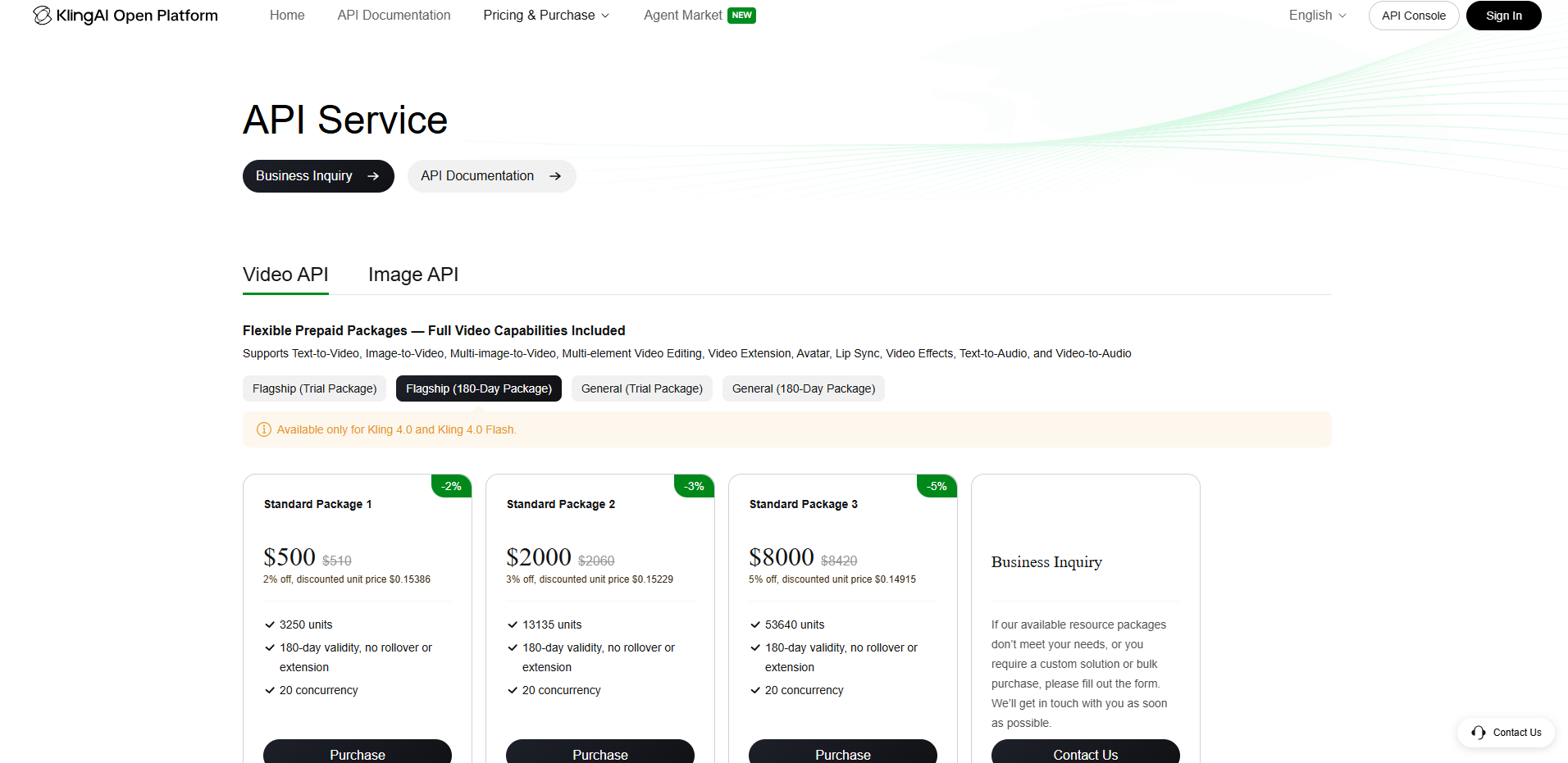
Developers who generate through Kling's API use the KlingAI Open Platform, which sells prepaid packages and not memberships, so none of the plan figures above apply to it. The video side lists Flagship and General packages, each with a trial version and a 180-day version.
The Flagship 180-day packages are sold only for Kling 4.0 and Kling 4.0 Flash, and the larger packages carry small discounts.
Package | Price | Units | Discount | Price per unit | Concurrent tasks |
|---|---|---|---|---|---|
Standard Package 1 | $500 | 3,250 | 2% | $0.15386 | 20 |
Standard Package 2 | $2,000 | 13,135 | 3% | $0.15229 | 20 |
Standard Package 3 | $8,000 | 53,640 | 5% | $0.14915 | 20 |
A fourth card routes custom and bulk purchases to a business inquiry form.
Two details matter more than the prices. Sixteen times the spend between the first and third package lowers the price per unit by only about 3%, so buying big saves little. Every package shown also carries 180-day validity with no rollover or extension, against two years for credits bought in the app. The packages do not say how many units a second of video uses, so a per-clip cost needs that figure from Kling's API documentation or a test call before any budget is set.
Image generation is priced separately. The General 180-day image packages run from $350 for 100,000 units to $5,670 for 1,800,000, at $0.0035 per unit and $0.00315 from the $1,890 package up, and they do not cover Kling Image 4.0 or Kling Image 4.0 Flash.
That covers every route Kling sells, and a few smaller questions remain.
Questions
4What happens to my credits and features if I cancel?
The plan runs to the end of the paid cycle, then the account reverts to a regular account without membership benefits. Purchased credits keep their two-year validity, while the plan's own credits run out on their one-month clock.
Can I change plans mid-month?
Kling allows changes between grades, and between Premier's credit steps, under rules shown on the subscription page at the time of the change.
Does Kling offer a team plan?
Yes. Team Membership is charged per seat each month, and seats added mid-term are billed pro rata. Credits are managed inside the team space by the owner and administrators, and they cannot be moved between personal and team spaces.
Can I use Kling videos commercially on a paid plan?
Yes. Kling's terms let members use, modify and distribute output for commercial purposes, except to build products or services that compete with Kling.
Conclusion
Clip length is the lever to watch next, and it keeps growing. Because every generated second is billed, a 30-second attempt costs twice a 15-second one at any given rate, and every retake repeats that bill. The longer the model allows, the more a vague brief costs.
Planned shots keep the bill small. A focused six-second shot costs 72 credits at 1080p with sound on Kling 3.0, and a loose 15-second scene costs 180. The useful habit is deciding what a shot must show before the first attempt, then logging the credits spent per kept clip for a week. That number, rechecked whenever Kling changes a plan or releases a model, will outlast every price on the pricing page. The cheapest second of video is the one that never gets generated.
Cutting and sound design still decide whether a generated clip works as a film. Teams that would rather brief a studio than manage credits can start with Original Design Studios' Motion & Video service, which names each generative tool it uses.